AIMS has a form for you to ring your chicks, which shows you all un-rung chicks.

It is ordered by age then Egg ID.
For un-rung chicks the Ring number field entry will be Egg XXXX
When you enter the ring number AIMS will automatically change the ID type from Not Recorded to Closed Ring.
Select the ID location if you want to record that and save the record.
You can order the grid by Ring or Age by clicking on the top of either of those two grid columns.
You can open this form from the top menu or the control the left of the main form.

Auto fill ring number #
Introduced in version 10.2.3, AIMS will now fill in most of the ring number for you automatically.
Most users will be using a rings with their company name on or similar.
Examples of this might be:
25GBMAGNUMFALCONS001X
The UK CITES authority are proposing a standardised ring format for UK breeders.

My personal concerns on this are that I feel the unique number should be at the start to allow incremental search and it should be 4 rather than 3 digits since some large breeders will be producing more than 999 birds in the near future.
The issue of incremental search issue we have taken care of in AIMS, see later in this article.
To have to type in all that information each time you ring a chick is a pain and during a busy season when you are tired it is likely to have typos in it at some point.
To get a ring number such as 25GB500AM001W you now only have to type in 1W and AIMS will auto complete the rest for you.
The same for 25GGMAGNUMFALCONS001X, you would only have to type 1X in the ring filed when ringing chicks.
How to configure auto fill ring details #
This feature is available if you have a current support subscription, which gives you access to the Pro menu.
You can format each of the two rings separately so that ring 1 can have your ring number system and ring tow tour compnay ring for example.
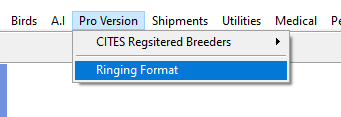

You can use all or part of the entries in this form depending on the ring format you want to use.
Breeder ID. This would be a breeder ID or CITES Registered breeders ID if you have one.
This is the same for ring one and two since you only have one breeders ID.
Ring text. The text you want to put on the ring, such as initials or company name.
Country ISO code. The country ISO code you want to use on the ring.
This is the same for ring one and two.
Length to pad ring number to. By default this is 3, so if you entered 1 as the ring number it would appear as 001.
Add space between each item in the ring number.
If unchecked it would give:
25GBMAGNUMFALCONS001X,
if checked:
25 GB MAGNUMFALCONS 001 X
Use full year.
If unchecked would give:
25 GB MAGNUMFALCONS 001 X
If checked would give:
2025 GB MAGNUMFALCONS 001 X
Use Auto ring format when ringing chicks. If this is ticked AIMS will auto expand rings when you use the ring chick form.
Order for ring format #
This allows you to select both the order in which items appear on the ring and also which items appear on the ring.
To change this click on the Change Ring Format button to bring up the dialogue for this.
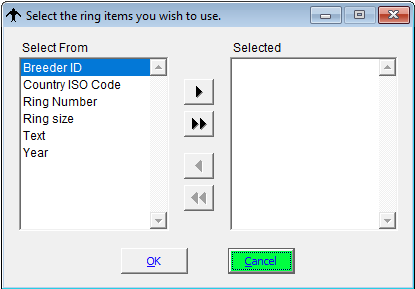
Select both the items you want to appear on the ring and also the order on the ring number for of those items by moving each one from select from column to the selected column.
In the image below we have selected not to use the Breeder ID
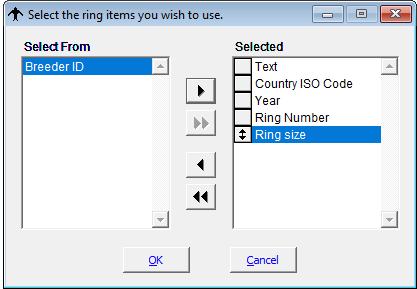
Once you have selected the items you want click the OK button to close the form.
Click on the update Expanded Ring button to show you how your ring will look.
From this point on when you want to ring a chick you only need to type the actual ring number and the ring size letter, if you are using one, and AIMS will auto fill the ring number on the ring chick form for you.
incremental search on complex ring numbers #
If your ring format is something like:
25GGMAGNUMFALCONS001X
Then using incremental search to locate birds is difficult as the actual number, 001, is buried deep within the ring number.
To overcome this issue we have added two new fields, ID 1 Search and ID2 Search, in the List control on the toolbar. These contain just the number on the ring and is filled in for you automatically when you ring a chick.

These will allow you to quickly locate a bird in the list control.
This feature can be tuned on and off from the preferences form.

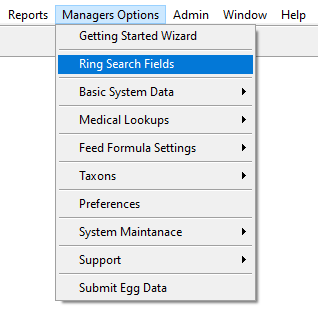
You can also enter the details for these fields for your existing stock by using the ring search form.