
The UK CITES authority have asked that applications for CITES Registered Breeders include the country of origin for each bird listed.
We have added an entry for this to the bird forms and updated the auto generated CITES Registered Breeders spreadsheet to include this.
To save users having to complete these for every bird by hand we have added a feature that will take known text in the ring number and auto complete the country of origin.
You can access this form to add you own entries from the Utilities menu


These can be whole words in the text or just at the start of the ring number.
For example RX and RW at the start of a ring number would set the country of origin to United States of America.
To use the text at just the start of the ring number, check the ‘Search for text only at start of the ring number’ check box, as in the above image. This would use the country of origin Denmark for any rings that start with DK.
To search for the work anywhere in the ring leave this unchecked, as in the image below.
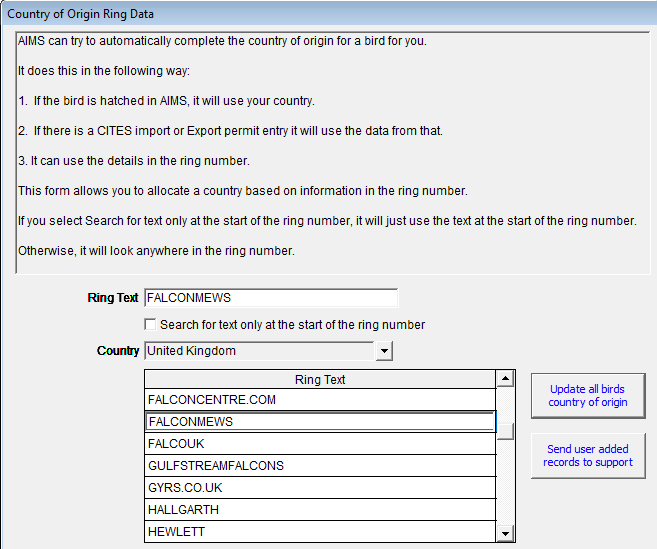
In the above image if a ring had FALCONMEWS anywhere in the ring number it would set country of origin to United Kingdom.
The text is not case sensitive and we use upper case in both the text to check and the ring number details to perform the checking.
Once you have added you own entries you can click on the Update all birds country of origin button to have AIMS check your birds ring numbers against the new entries.
It will only update entries where the country of origin is listed as Unknown
You can also our support team a list of the ones you have aded so that we can include these into the main files for all users.
If the bird comes for an egg hatched in AIMS it will set the county of origin to the uses country.


