
You may at some point want to reset the auto egg numbers in AIMS.
This could be because you have been using manual numbering and now want to move over to auto numbering or you may have had a computer crash when adding an egg and need to reset the next number so that you don’t have a missing number in your egg sequence.
To reset the number on an egg you need first to turn off the auto numbering.
This is done via the incubation page on the preferences menu, which can be found under the Manager Options menu heading.
Untick the box entitled Auto Generate Egg Numbers

This will allow you to edit an egg number on the egg form.
Once you have done this make a note of the highest egg number you have.
Then go back to the Preferences form and turn the Auto egg numbering back on.
Close the egg form and goto the Data manager on the Admin menu
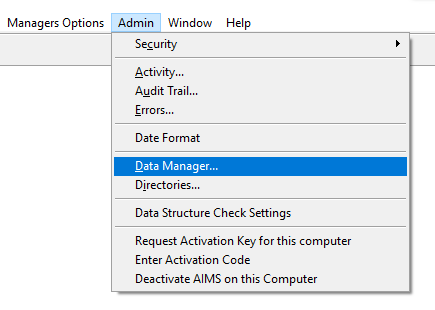
This will open the Data Manager form
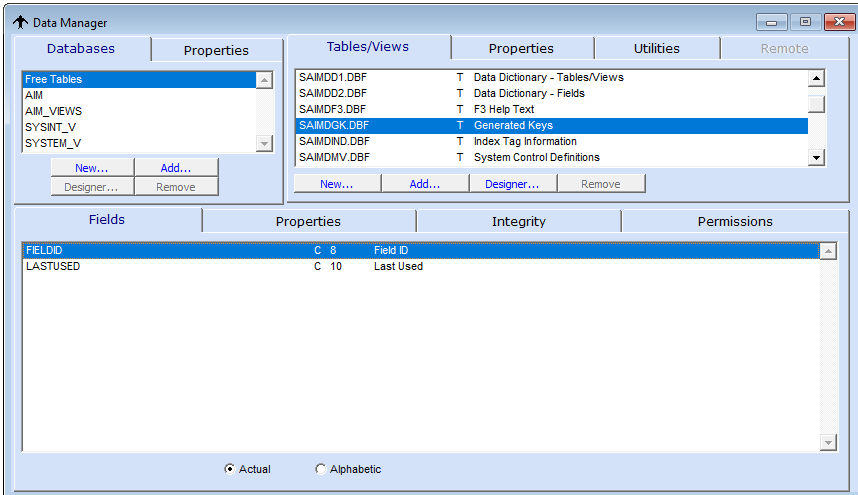
On the left hand side of this in the Databases section select Free Tables.
On the right select Generated Keys
Then select the Utilities Tab and click on the Browse button
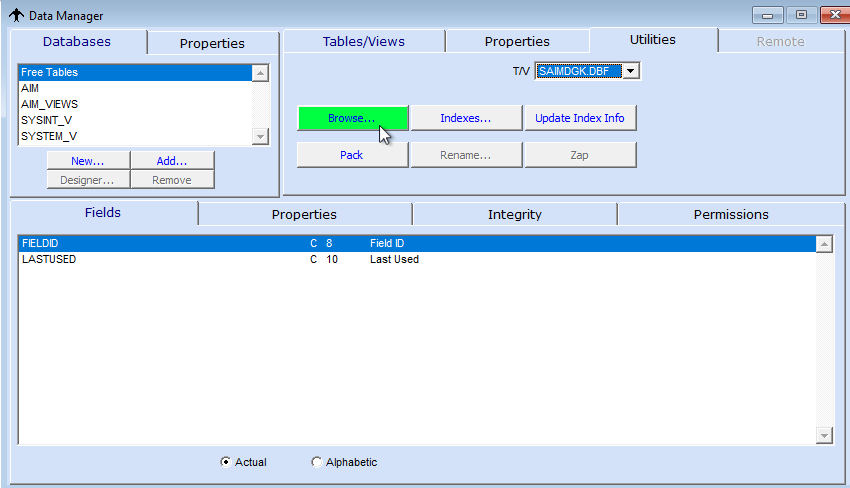
In the form that opens up scroll down to the egg entry.
This will be in the form of EGG and then the year, e.g. EGG2026 for 2026 eggs
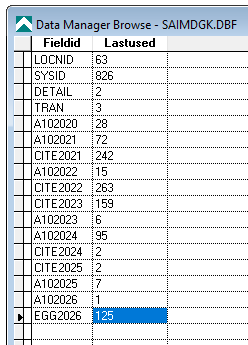
In the right hand column change the number to the last egg number you have used.
Then click on another entry in the form and close the form and the data manager.
Now when you add a new egg it will have the next number, i.e. one higher the number you entered for the EGG2026.
For the above example the next egg number woudl be 126